I pentest ships for a living and my side project is a pixel art editor
Ready for the LinkedIn hook? How building a creative tool on the weekends taught a security consultant about shipping, users, and avoiding the enshittification of software.
But seriously, have you ever visited websites only to let out the biggest sigh because the only functionality you were looking for is paywalled? To me that feeling sits with me the same way as the bad practices against right-to-repair, which if you're following someone like Louis Rossmann recently, will know can even cripple your own country's capabilities by relying on contractors for everything.
Now, I'm fully aware that I'm preaching against my own case as a security consultant. But since I work for a classification society try to consider me as a lesser evil.
The sigh is also why my side project is built the way it is: a full pixel art studio where all the tools are available to everyone, either just visiting without an account or serious power users.
What is Gribble?
Take a quick look: gribble.app
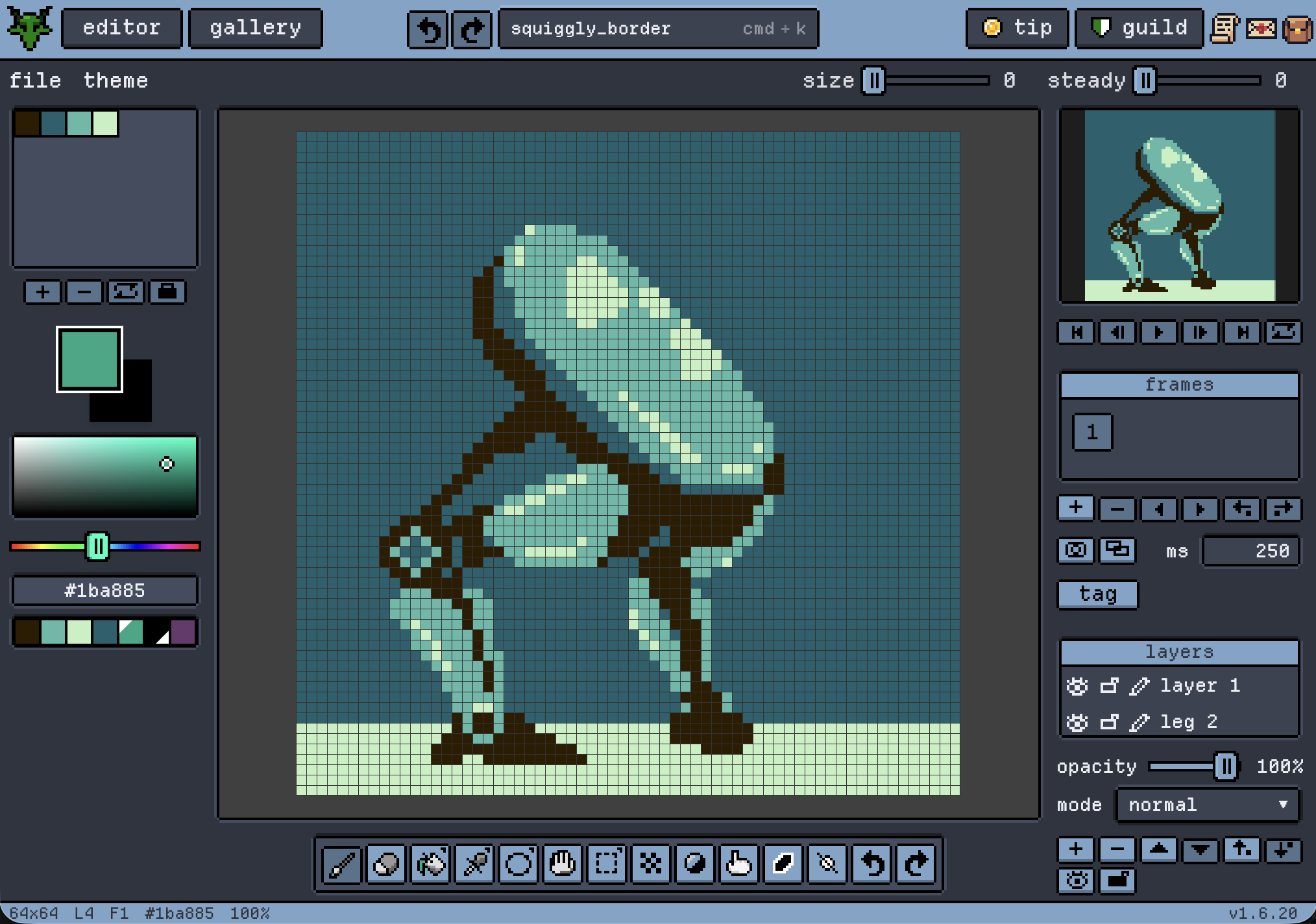
Gribble is my cross-platform pixel art editor I started on last year to teach myself about CI/CD, securing websites, creative coding and of course the art of pixelating. It's my own pocket editor I can pull up anywhere to work on art ideas, either as an app or website, and something I wanted to share. The android app is up and running, and iOS is up soon (fellow app builders will know the pains of app store submissions).
The editor is free and easy to get started with, and all tools are available for everyone. It has a social aspect with user-generated content in a public gallery and classic SNS features like followers and likes. Although there is no real "for you"-place working yet, the gallery is browsable by anyone and some filtering options exist.
Inspiration behind the styling
Gribble is a stylized app trying to capture a retro cozy pixel art style, and it is far from a finished product visual-wise. I read this blog a few years ago about how someone created dynamic pixel art by using CSS box-shadows, which sounded like black magic. The way it was done was basically torturing a CSS feature to look like nice blocks, row after row, to create a funny pikachu. This is the one.
I wanted to use this to create my own frontend components, and version 1 used this method. It was tedious, used a lot of code lines and had obvious flaws at scale. But it worked. And it was so fun to make it dynamic so that I could stretch frontend components and the pixels would adjust. The main flaws when scaling up to dynamic components was the anti-aliasing and visible seams that appeared between the "pixels" at different website zoom levels. So at a point I moved to use JavaScript canvas. Now all the pixel components and frames on Gribble are actually canvas elements.
Funny loop: I made Gribble as a tool to export this CSS code, and used the code to make the tool look better. And that kind of continued and continued until it looked like a whole pixelized site.
I use Vue for my frontend and Capacitor wraps it into mobile apps.
Backend and stuff
I'm a solo dev so the biggest goal was always to develop and ship with the least amount of friction whatsoever. That means one command in the command line to to deploy, build app bundles and ship away.
To be able to do something like this, and also to maintain a secure and efficient developer environment, I went with firebase. They've abstracted so much stuff so that a frontend developer can do way more than they might think. With some willpower and getting your hands digitally dirty you will learn their connected noSQL database, authentication support and blob storage in no time. In addition, I made two separate firebase projects to separate my staging environment from my production environment, which allows me to have a "digital twin" of my production site where I can be as malicious as I want.
But the core of my backend is really in my CI/CD workflow on Github. It's the part I'm most proud of and might do a separate blog post on altogether. Based on how I'm pushing my commits to Github, it will do one of three things:
- Only deploy to my staging site
- Deploy to staging and upload app bundles to test tracks (Android/iOS)
- Deploy to production and upload app bundles to production tracks (Android/iOS)
Lesson 1: Shipping beats polishing
I'm definitely a person that could polish and perfect forever and ever without ever reaching a point where I'm truly content with my work. But you can't reach the best version of your product without your users reacting to it. And for that you either need a massive amount of testers willing to spend the time, or you jump the gun.
This often comes up at work as well, as you can come up with the most beautifully and efficient test program for a customer but when you show up the scope might change drastically. It might be because of someone's misunderstanding, or a bureacratic process intervening, but you have to work through it while in the middle of it anyways. Especially if you've flown half across the globe to get there. Don't ask me how I know.
I like to remind me with this analogy as it helps with just starting to put stuff out there, this blog post included.
That said, just a couple months ago I signed up for a rental car website and they sent me my password in clear-text in the "thank you for registering"-email. So polish at least A LITTLE BIT before shipping.
Lesson 2: Security work made me build differently
They say the cybersecurity career pipeline goes from a motivated junior to an off-the-grid farmer, and although I'm yet to feel tempted enough to drop the technical grind it has definitely made me a more skeptical practicioner.
Gribble builds on a foundation of many a late night scrutinizing the security of my own site. Authentication, database rules and gating admin features stands at the absolute core of any serious website, and the reach goes across the whole site.
Gribble is built around "deny by default" and leaving the serious stuff like authentication to 3rd parties (firebase). Guests have a baseline access to all tools, users with accounts can do more with the same tools and join socials, and paying users are getting their limits sent to the sky.
What's next
Here's what's coming up!
- iOS release in review
- A timelapse export format for pixel artists to avoid the clunkiness of screen recording
- More features on my pixel experiments site lab.gribble.app
- And my favorite: a museum-like global gallery with picture frames to make scrolling pixel artworks fun